
To auto pause EAs after a drawdown, run one account-level guard that watches equity and acts in two steps. Stop new entries at about two-thirds of your limit, then close everything and lock every EA at the limit. For most retail accounts, a hard limit of 10 to 15% below peak equity plus a 3 to 5% daily cap is a sound starting point. The reference point you measure from matters more than the percentage itself.
TL;DR:
- Measure drawdown on equity, which includes floating losses, because balance ignores open trades that are already underwater.
- Use three tiers: an alert near 5%, a stop on new entries near 8%, and a hard stop that closes everything near 12%, scaled to your robot's real record.
- Set the hard limit at about 1.5 times the worst drawdown you have actually seen from the strategy, not the number you hope for.
- MetaTrader has no built-in account-wide switch, so you need a guard EA that closes positions and either flags or removes the other EAs.
- Make the lock manual to undo: restart after a cool-off, at reduced size, once you have checked why it fired.
Table of Contents
- Why Pausing EAs After a Drawdown Takes an Account-Level Switch
- Auto Pause EAs After Drawdown: The Settings to Start With
- Equity or Balance, and Which Peak to Measure From
- Picking the Hard Limit: Recovery Math and Your Robot's Real Record
- How to Wire the Pause When MetaTrader Has No Built-In Switch
- Running Several EAs: Per-Robot Limits Under One Account Cap
- When the Pause Misfires, and What to Do on Restart
- Get Drawdown Rules Handled Without Writing a Line of Code
- Frequently Asked Questions
- Sources
Why Pausing EAs After a Drawdown Takes an Account-Level Switch
Each EA only sees its own trades. Run four robots and every one of them can sit inside its own rules while the account bleeds, because the losses stack. A per-trade stop caps one position. It does nothing about ten positions losing together, or a robot that keeps re-entering after each stop-out. How a stop order actually fills is a separate question, and Stop Loss Limit: The Distinction That Decides If You Get Filled covers it. If you are not sure every robot you run even places a stop, check that first with Forex Robot Stop Loss: Does Every Trade Get One?.
Your broker does have a backstop, but it is a margin rule. Under the retail CFD measures ESMA coordinated for the EU, brokers close positions when your equity falls to 50% of the required margin. That protects the broker and arrives late for you. You want your own rule sitting between "one bad trade" and "the broker closes me out." Think of a coach who can pull the whole line off the ice instead of waiting for each player to skate off on their own.
Auto Pause EAs After Drawdown: The Settings to Start With
These are starting values for a retail account running one to four EAs on a trend-following or swing style. Scale them to your own strategy using the next two sections.
| Setting | Starting value | Why |
|---|---|---|
| Warning alert | 5% below reference equity | Push notification and email. No trading action. |
| Pause new entries | 8% below reference equity | Existing trades keep their stops and exits. Nothing new opens. |
| Hard stop | 12% below reference equity | Close all positions, delete pending orders, lock every EA. |
| Daily loss cap | 3% of start-of-day equity | Catches a bad day before it becomes a bad month. |
| Per-EA limit | 8% of account equity, by magic number | Benches one misfiring robot while the others keep playing. |
| Restart rule | Manual, after 24 hours, at half lot size | Forces you to look at what happened. |
The ratios matter more than the exact numbers. The entry pause sits at roughly two-thirds of the hard stop and the alert at roughly 40%. That gives you a warning, a slowdown and a stop, in that order, instead of a single cliff edge.
Equity or Balance, and Which Peak to Measure From
Use equity. Balance only changes when a trade closes, so a guard watching balance will sleep through a floating loss of any size. MetaTrader exposes both values, and the MQL5 documentation for AccountInfoDouble lists ACCOUNT_EQUITY and ACCOUNT_BALANCE as separate properties. Your guard should read the first.
The reference point is where most setups go wrong. You have three choices:
- Starting balance. Simple, but it goes stale. After a 30% gain, a 12% limit from the starting balance lets you give back a large share of your profit before anything fires.
- Peak equity, live. It tracks your high-water mark tick by tick. The catch is that a trade floating $300 in profit that closes at $50 leaves a reference $250 above anything you banked, so your limit tightens on money you never held.
- Highest end-of-day equity. Snapshot equity once at server midnight and ratchet the reference only from those snapshots. This is my pick. It follows real growth and ignores intraday spikes.
A guard that measures balance will sleep through a floating loss of any size.
Store the reference in a terminal global variable or a file. If it lives only in memory, a terminal restart on your VPS resets it to current equity and your limit quietly disappears.
Picking the Hard Limit: Recovery Math and Your Robot's Real Record
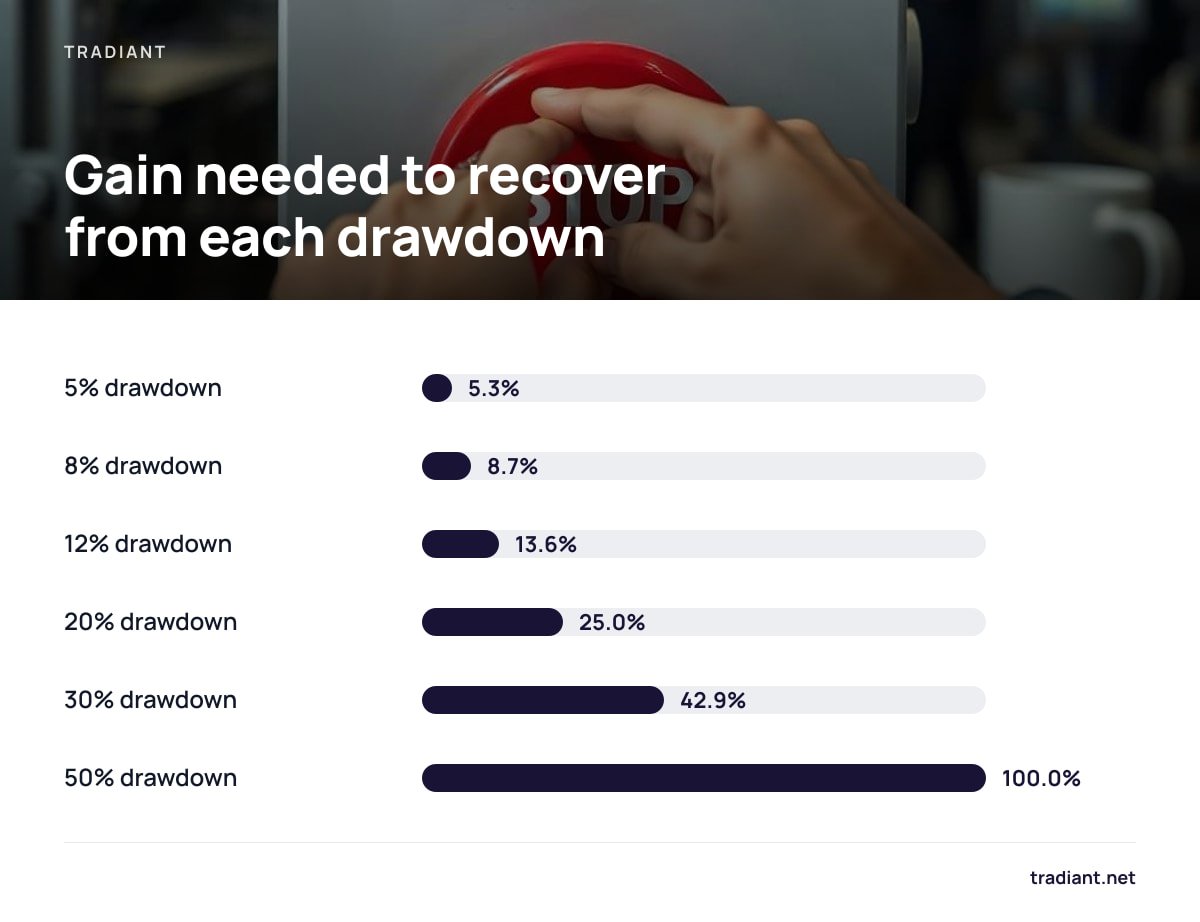
Loss and recovery are asymmetrical, so the hard stop should sit well short of the levels people call "survivable." Drawdown Explained: Why a 50% Loss Needs a 100% Gain walks through the arithmetic. The short version:
| Drawdown | Gain needed to recover |
|---|---|
| 5% | 5.3% |
| 8% | 8.7% |
| 12% | 13.6% |
| 20% | 25.0% |
| 30% | 42.9% |
| 50% | 100.0% |
Past 20%, recovery needs more than a normal strong year. The hard stop exists to keep you out of that zone.
For the number itself, take the worst drawdown you have seen from the strategy in live or forward-test trading, and multiply by 1.5. A robot whose worst stretch was 8% gets a 12% hard stop. Backtests tend to understate future drawdown because the future will contain a sequence the history did not, so treat a backtest figure as a floor and add more room. If the robot has no live record, set the limit tighter and widen it later, only after the data justifies it.
How to Wire the Pause When MetaTrader Has No Built-In Switch
Neither MetaTrader 4 nor 5 ships with a setting that pauses every EA at an account drawdown level. The terminal lets code read whether algo trading is allowed, but a script cannot flip the Algo Trading button for you. So you build the switch from pieces that do exist.
Option 1: A guard EA and a shared flag
Put a small guard EA on its own chart. Every few seconds it compares equity to your reference. When a tier trips, it sets a global variable, for example HALT_ALL = 1. The MQL5 GlobalVariableSet function stores that value in the terminal, where every other EA on the same terminal can read it. This only works if your other EAs check the flag before opening trades, which means you need their source code or an input that supports it. Many commercial robots have neither.
Option 2: A guard that removes the other EAs
When you cannot edit the robots, the guard can close them out. At the hard stop it closes all positions, deletes pending orders, and then shuts the charts the EAs run on. MQL5's ChartClose function closes a chart by ID, and an EA attached to a closed chart stops running. This works with closed-source robots. The cost is that you reopen charts and reattach EAs by hand, which is the point: nothing restarts itself.
My pick is Option 2 for the hard stop and Option 1 for the softer tiers where you control the code. If you only do one thing, do Option 2.
Pro Tip: Test the guard on a demo account with the hard stop set to 0.5%, then restart the terminal mid-test. You are checking two things most people never test: that the lock survives a restart, and that the reference equity is still correct afterward. Terminal global variables also expire if nothing touches them for four weeks, according to the MQL5 documentation, so have the guard write a heartbeat value to keep the reference alive.
Running Several EAs: Per-Robot Limits Under One Account Cap
With multiple robots, you need two layers. The account cap protects the whole bankroll. Per-robot limits bench the one that is struggling. To measure a single robot, give each EA a unique magic number and have the guard sum profit and loss on positions carrying that number.
Watch for overlap. Four EAs that all go long USD against different pairs are really one trade with four labels, and your drawdown will arrive all at once. The account cap catches that. The per-robot limits will not, since each robot may only be down a few percent while the total is down much more. Run at Once: Run It Twice in Poker and Running Robots Together goes deeper on how correlated robots stack risk.
A per-robot limit of 8% of account equity is a reasonable start. If two robots trip it in the same week, that points to market conditions, so look at the account as a whole before restarting either.
When the Pause Misfires, and What to Do on Restart
A drawdown pause is not a guarantee, and it has three known weak spots.
- Gaps. If the market opens Monday well past your limit, the guard can only act on the first tick. Your loss will exceed the threshold by whatever the gap was.
- Slippage. Closing a dozen positions in fast markets does not happen at the prices you saw a second earlier. Expect the realized drawdown to land a little beyond the trigger.
- Trend followers. These robots often lose small for weeks and then make it back in a few trades. A tight limit can bench one right before its good stretch. Judge the limit against the robot's own history of recoveries, and accept that some pauses will turn out to be unnecessary. That is the price of insurance.
I would not let anything resume automatically. Wait at least 24 hours, read the trade log to see which robot or pair caused the damage, and come back at half your normal lot size. Return to full size only after equity makes a new end-of-day high. Cutting size after a drawdown feels like admitting defeat, but it keeps the next bad run from landing at full weight.
12% hard stop, 8% entry pause, 5% alert: if your robot's worst real drawdown is 8%, those three numbers give you 1.5 times its record before anything is closed.
Get Drawdown Rules Handled Without Writing a Line of Code
If building and babysitting a guard EA sounds like a second job, Tradiant is built around that problem. It is a managed service that runs a rotating squad of trading robots, currently Goldenhawk, on your own broker account, so your money stays with your broker. A live team sheet shows which robots are active and which are benched, the same bench-the-struggling-player logic this article describes. Accounts start from $500, and the fee is a 20% high-watermark success fee, so you pay nothing in a losing month and there are no setup or management fees.
Two caveats. The service opens in early 2027, so you cannot fund it today. And no pause rule, ours or yours, removes losses. Read the risk terms and the drawdown policy before you fund anything, including ours, and ask the live chat team to explain them in plain language if anything is unclear.
Frequently Asked Questions
Can MetaTrader pause all EAs automatically after a drawdown?
Not on its own. Neither MetaTrader 4 nor 5 has a built-in account-wide drawdown switch, so you need a guard EA that watches equity. At your limit, the guard closes positions and either sets a flag the other EAs read or closes the charts they run on.
What drawdown percentage should I use to pause my EAs?
Take the worst drawdown you have seen from the strategy in live or forward trading and multiply it by 1.5. For many retail setups that lands between 10% and 15%. Add a daily cap of 3 to 5% so one bad session cannot do the damage of a bad month.
Should I measure drawdown on balance or equity?
Use equity. Balance changes only when a trade closes, so it hides floating losses on open positions. A guard that watches balance can sit idle while the account is deeply underwater.
Does closing the chart actually stop an EA?
Yes, an EA attached to a chart stops running when that chart is closed, and MQL5's ChartClose function can close charts by ID. It works on closed-source robots, which is its main advantage. You have to reattach the EAs by hand afterward, which doubles as a deliberate restart step.
Is it safe to let EAs restart automatically once equity recovers?
I would not. An automatic restart removes the moment where you check what went wrong, and the conditions that caused the drawdown often still exist. Restart manually after a cool-off period, at reduced size.
Sources
- AccountInfoDouble: Account properties | MetaQuotes (MQL5 Documentation)
- GlobalVariableSet: Global variables of the terminal | MetaQuotes (MQL5 Documentation)
- ChartClose: Chart operations | MetaQuotes (MQL5 Documentation)
- Retail CFD product intervention measures | European Securities and Markets Authority (ESMA)
