
Giving an EA access to your MT4 account is safe from the risk most people mean by that question. An expert advisor is a file that runs inside your own terminal, it never receives your username or password, and it has no route to your bank. The danger comes from two other places: the person you hand a master password to, and a robot with no loss limit. An EA can trade your money away. It cannot move it out of the account.
TL;DR:
- An EA file (.ex4) runs inside your own terminal and never sees your login, so it cannot withdraw funds.
- A master password given to a person is a different deal: that login can trade, change your password and submit withdrawal requests.
- An investor password is read-only. It is the right credential for monitoring a signal or a third-party dashboard.
- A robot can still drain the account through bad trades. Set lot size and risk per trade before you install anything.
- Most "my EA will not trade" cases are AutoTrading switched off, live trading unticked, or a broker symbol suffix mismatch.
Table of Contents
- Is It Safe to Give an EA Access to My MT4 Account? Start With the Word Access
- What an EA Can Do Inside Your Account, and What It Cannot Reach
- How to Put an EA in MT4: Seven Steps, Two Checkboxes, One Restart
- Master Password, Investor Password, or No Password at All
- Why Is My EA Not Taking Trades? Six Checks That Solve Most Cases
- $500, MT4 and MT5: The Two Questions That Follow Every EA Install
- The Risk That Actually Drains Accounts: Drawdown
- Run a Robot on Your Own Account Without Giving Up the Keys
- Frequently Asked Questions
- Sources
Is It Safe to Give an EA Access to My MT4 Account? Start With the Word Access
The word "access" hides two very different arrangements, and most forum threads about this mix them up. An expert advisor is a compiled file, .ex4 on MT4 and .ex5 on MT5, that you copy into your own terminal's Experts folder and switch on with a checkbox. It never sees your username or password, because it runs inside a session you already opened.
Handing your master password to a person, a signal group or a self-described manager is a different transaction. That login works from any machine. Whoever holds it can open positions, close yours, change your password so you lock yourself out of the platform, and submit a withdrawal request from inside the terminal.
A robot can trade your money. It cannot move your money off the account, because MT4 never pays out. Your broker processes withdrawals against the payment method registered to the account holder, and the account holder is you. That check is the one thing to verify before trusting any third party with a live account, and we go through the mechanics in Can a Forex Account Manager Withdraw My Money?
An EA can lose your money. It cannot take your money.
A small number of brokers, mostly those funded by crypto, let you type a fresh wallet address into a withdrawal request and approve it without a name check. If yours works that way, a master password holder can redirect funds and no amount of EA discipline will save you. Ask your broker's support desk whether payouts are restricted to the account holder's own registered method before you delegate anything.
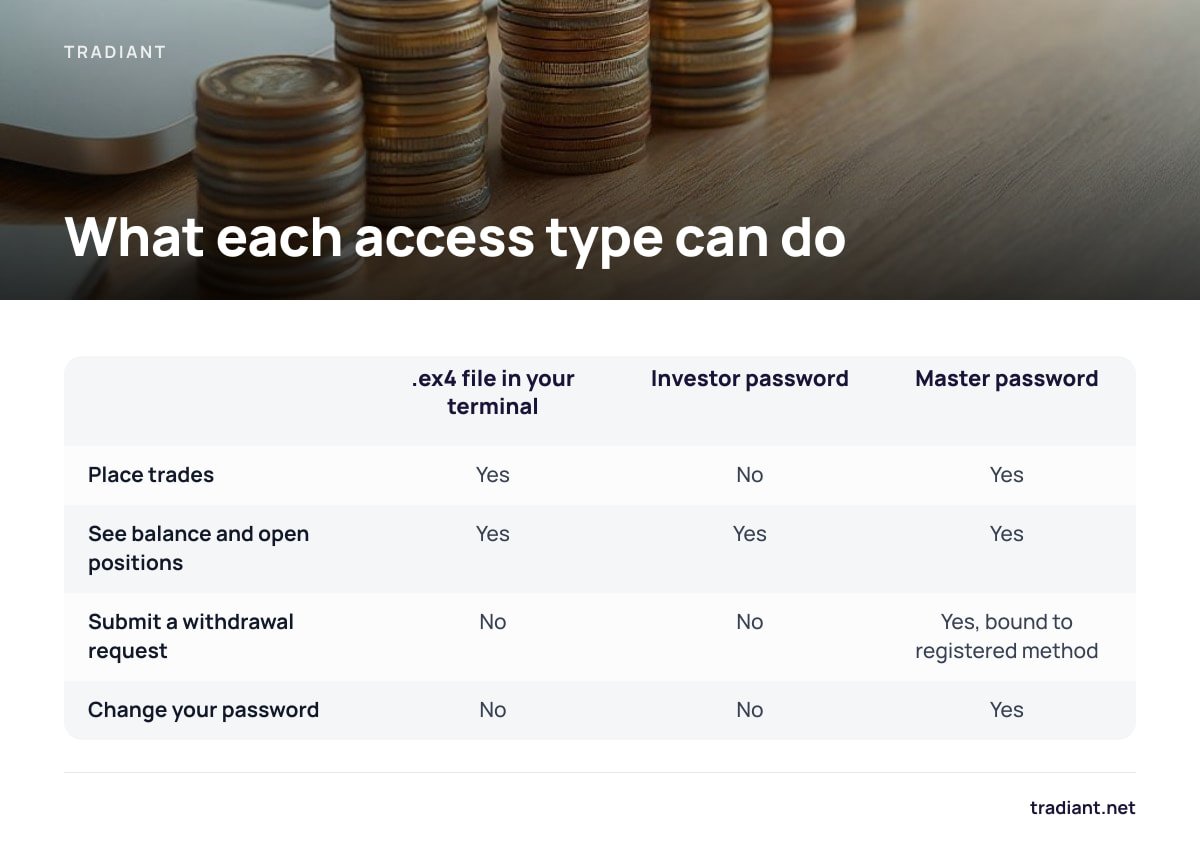
What an EA Can Do Inside Your Account, and What It Cannot Reach
| What you hand over | Place trades | See balance and open positions | Submit a withdrawal request | Change your password |
|---|---|---|---|---|
.ex4 file running in your own terminal |
Yes | Yes | No | No |
| Investor (read-only) password | No | Yes | No | No |
| Master password | Yes | Yes | Yes, bound to your broker's registered method | Yes |
| Rented VPS with your master password stored | Yes | Yes | Yes, same limit as above | Yes |
The bottom row catches people who assume a virtual private server is neutral ground. A VPS provider that keeps your master password on file holds exactly the same power as a stranger you emailed it to, minus the intent. Rent from a host that lets you enter the password yourself and never stores it in plain text, or run the terminal on your own machine.
The investor password is read-only by design across the MetaTrader family, which makes it the right credential for a signal feed, a trade journal app, a copy-trading viewer or a performance dashboard. It cannot place an order and it cannot start a withdrawal.
How to Put an EA in MT4: Seven Steps, Two Checkboxes, One Restart
- Get the file. You need the compiled
.ex4(MT4) or.ex5(MT5). Source code (.mq4) requires you to compile it yourself with MetaEditor. - Drop it in place. In MT4, go to File > Open Data Folder, then MQL4 > Experts, and paste the file there. Do not put it in the Indicators folder; it will not appear.
- Refresh the Navigator. Right-click inside the Navigator panel and choose Refresh. If the EA is still not listed, close and reopen the terminal.
- Attach it to the right chart. Open the symbol and timeframe the developer specifies, then drag the EA from the Navigator onto that chart. Wrong timeframe is the most common silent failure with newer EAs.
- Tick the two boxes that matter. On the Common tab, tick "Allow live trading". On the Inputs tab, set lot size, magic number and any risk setting the EA exposes. Click OK.
- Check the face. A small smiley in the top right corner of the chart means the EA is running. A sad face means it is attached but disabled. The AutoTrading button on the toolbar must be green as well.
- Read the Experts tab. The terminal logs every initialization and every rejected order there. This is the first place to look when nothing happens.
Pro Tip: Leave "Allow DLL imports" unticked unless the developer can name the DLL and explain what it calls. Almost every commercial EA works fine without it, and it is the only checkbox that lets a program reach outside the terminal and into your machine.
MetaQuotes sells validated EAs through the MQL5 Market, where listings pass automated checks before they go live and licenses are tied to specific account numbers. That is a reasonable place to start if you want a second opinion on a file before it touches a funded account. The language documentation at MQL5 Docs is also worth a skim, if only to confirm that .ex4 and .ex5 files are not interchangeable.
Master Password, Investor Password, or No Password at All
A self-hosted EA needs no password at all. You install it in a terminal you are already logged into, so there is nothing to send anyone. If a seller asks for your master password to install a robot you bought and run yourself, that is a reason to stop and ask why.
You need an investor password when you want someone else, or some other system, to watch the account. Prop firm dashboards, verified track records and third-party analyzers all work through read-only credentials. Handing over the investor password costs you nothing in trading capability because it grants none.
You need a master password when you delegate trade decisions to a human. Most regulators treat that as discretionary management, and the paperwork matters. In the United States, NFA rules require written authorization before a third party may trade a customer account on a discretionary basis. In the UK, the FCA keeps a warning list of unauthorized firms that have been reported for exactly this kind of solicitation.
Why Is My EA Not Taking Trades? Six Checks That Solve Most Cases
AutoTrading is off. The toolbar button turns green when it is on. An EA can sit on a chart for days with the button grey and never fire a single order.
"Allow live trading" is unticked. This is a per-chart setting, not a global one, and it resets every time you reattach the EA.
Your broker's symbol has a suffix. EURUSD at one broker is EURUSD.m, EURUSD.pro or EURUSD.raw at another. An EA hard-coded to "EURUSD" will not find ".m" and will log an error instead of trading.
The EA's own filters are blocking it. Many robots carry a maximum spread filter, a news blackout window and a session filter. If your broker's spread on a major pair stays above the EA's cap during the Asian session, it will wait.
There is not enough free margin. A lot size that is fine on a $5,000 account is not fine on $500. The journal usually reports error 134, which means not enough money.
The trade parameters are rejected outright. Error 130 is invalid stops, 131 is invalid trade volume, 138 is a requote. All three point to a mismatch between the EA's assumptions and your broker's rules on minimum stop distance or minimum lot size.
On MT5 there is a seventh check. Netting accounts handle multiple positions on the same symbol differently from hedging accounts, and an EA written for hedging can behave strangely or refuse to open a second trade. Confirm which mode your account uses before you blame the robot.
$500, MT4 and MT5: The Two Questions That Follow Every EA Install
Is $500 enough to trade forex?
For opening an account and running a robot, yes. It is enough at most brokers, and it is the figure most introductory programs are built around. What it changes is your lot size. On a major pair with 1:30 leverage, the cap that ESMA applies to retail clients in the European Union, $500 controls roughly $15,000 of notional currency. That is 0.15 standard lots at maximum margin, which you should never use.
Risk math constrains you more. One percent of $500 is $5. A 0.01 lot position on EURUSD pays about $0.10 per pip, so a 50-pip stop loss costs exactly $5. That is your ceiling: micro lots, tight stops, and absolute returns measured in single-digit dollars per good trade. Any EA with a stated minimum deposit of $5,000 is not built for a $500 account, no matter how good its backtest looks.
Which is better, MT5 or MT4?
They are separate platforms with separate languages, and an .ex4 file will not load on MT5. MT5 has more timeframes, faster strategy testing and native netting and hedging modes. MT4 has the larger library of older EAs and a lighter footprint on an old laptop or cheap VPS.
If you are starting fresh in 2026 and the strategy you want exists on both, take MT5. If the specific EA you have chosen is MT4-only, take MT4 and accept that MetaQuotes has been directing its development effort toward MT5 since that platform launched. Check the version a seller actually supports before you buy, because "MT4 and MT5" on a sales page often means two different builds with different results.
The Risk That Actually Drains Accounts: Drawdown

Nobody steals a retail forex account by hating you. It gets drained by a position that goes the wrong way and keeps running. A robot has no instinct to stop, no fear and no judgment about regime change, so the loss limit has to come from somewhere else: the EA's own settings, or you.
A 50% loss requires a 100% gain to get back to even, which is why drawdown deserves more attention than returns. We break the numbers down in Drawdown Explained: Why a 50% Loss Needs a 100% Gain.
MT4 has no built-in loss cap for an EA. The stop-out level you get came from your broker, and it was set before your robot ever loaded.
One family of strategies is worth naming because it hides this risk well. Martingale systems double the position after each loss, which keeps the equity curve smooth and small right up to the moment it is not. If you want the mechanics, read Martingale Forex EA: How It Works and Why It Blows Up before you install one on a live account, and set a hard daily loss number in your head before you set anything else.
Run a Robot on Your Own Account Without Giving Up the Keys
Tradiant is building a managed automated forex trading service that opens in early 2027, and the design decision behind it maps directly onto the problem in this article. The robots run against your own broker account, so the money never leaves your custody and the withdrawal rights never leave your name. You start from $500, keep 80% of the profits, and pay a 20% success fee measured on a high-water mark. No monthly fee, no setup fee, no management fee, and nothing charged in a losing month.
The squad rotates, so the robot trading this month may be benched next, and there is a live team sheet showing which ones are active and which are sitting out. One caveat: rotation manages a strategy going stale, it does not remove drawdown. Managed trading still loses money in bad conditions. Check the current team sheet, compare the minimum lot sizes and historical drawdown against anything else you are considering, and read the risk disclosure before you commit a dollar. If you want to ask a person first, there is 24/7 live chat and free booked calls.
Frequently Asked Questions
Is it safe to give an EA access to my MT4 account?
Yes, in the sense that an EA file runs inside your own terminal and never receives your login details, so it cannot withdraw money. The risk is trading risk, not theft. That changes the moment you hand a master password to a human, because that login can trade, change your password and submit withdrawal requests.
How do I put an EA in MT4?
Open File > Open Data Folder, go into MQL4 > Experts, and paste the .ex4 file there. Right-click the Navigator and choose Refresh, then drag the EA onto the chart with the symbol and timeframe the developer specifies, and tick "Allow live trading" on the Common tab. A smiley face in the top right corner of the chart means it is running.
What is the difference between an investor password and a master password?
An investor password is read-only. It lets a person or app view positions and balance but grants no ability to trade or withdraw. A master password gives full control, including placing orders, changing the password and submitting withdrawal requests bound to your broker's registered payment method.
Is $500 enough to trade forex with an EA?
Yes, $500 is enough to open an account and run a robot at most brokers. It limits you to micro lots: at 1% risk per trade, one percent of $500 is $5, which is a 50-pip stop on a 0.01 lot position on EURUSD. Expect small absolute returns, and avoid any EA that states a minimum deposit of $5,000.
Which is better, MT5 or MT4 for running an EA?
An .ex4 file built for MT4 will not load on MT5, so the deciding factor is which platform your chosen EA supports. If the strategy exists on both, pick MT5 for faster backtesting and more timeframes. If your EA is MT4-only, run MT4 and accept the smaller feature set.
Why is my EA not taking trades?
The three most common causes are the AutoTrading button being grey, "Allow live trading" being unticked on the chart, and a broker symbol suffix such as EURUSD.m that the EA cannot find. Check the Experts tab at the bottom of the terminal for error codes: 130 means invalid stops, 131 means invalid volume and 134 means not enough money.
Sources
- MQL5 Market | MetaQuotes
- MQL5 Documentation | MetaQuotes
- Investor Resources | National Futures Association
- Product Intervention on CFDs and Binary Options | European Securities and Markets Authority
- Consumer Protection and Warning List | Financial Conduct Authority
